
GPIO, Trigger Presets with Door Contact
This guide explains how to trigger different presets automatically when a door opens or closes using a magnetic contact sensor and the GPIO Card.
1. Hardware
Wire the magnetic contact closure to the GPIO Card:
Connect positions 1 & 2 together on the GPIO terminal.
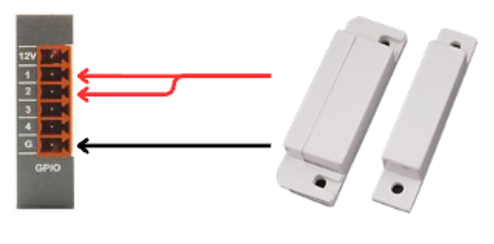
This allows the door’s open/closed state to be read as a GPIO input.
2. Software
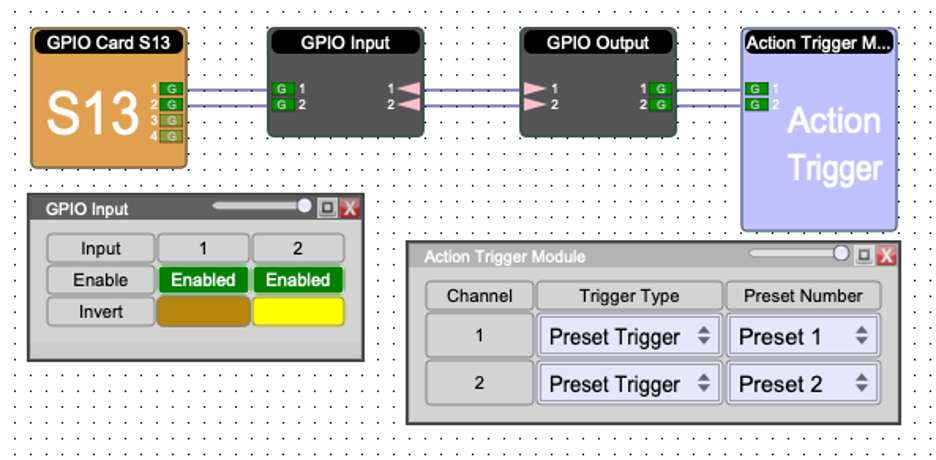
Add the following modules in your project:
GPIO Input Card
Then:
Open the GPIO Input block and invert one Logic input — this allows the system to toggle between presets when the door opens or closes.
In the Action Trigger Module, assign which presets should fire:
Door closed → Preset 1
Door opened → Preset 2
OFF state → Preset = -1 (no preset active)
3. Test
Close the door → Preset 1 triggers
Open the door → Preset 2 triggers
Verify that each door state correctly triggers the assigned preset.