
Audio Control with a 10k Potentiometer
This guide explains how to use a 10k potentiometer connected to the GPIO Voltage Input Card to control audio gain in your system.
1. Hardware
Wire the 10k potentiometer to the GPIO Voltage Input Card
(Follow the wiring reference for the correct pin connections.)
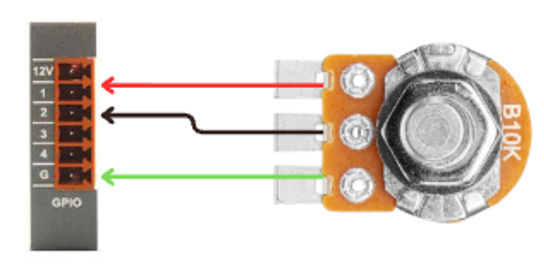
This allows the potentiometer’s voltage sweep to be read as a control signal.
2. Software
Step 1 — Add required modules
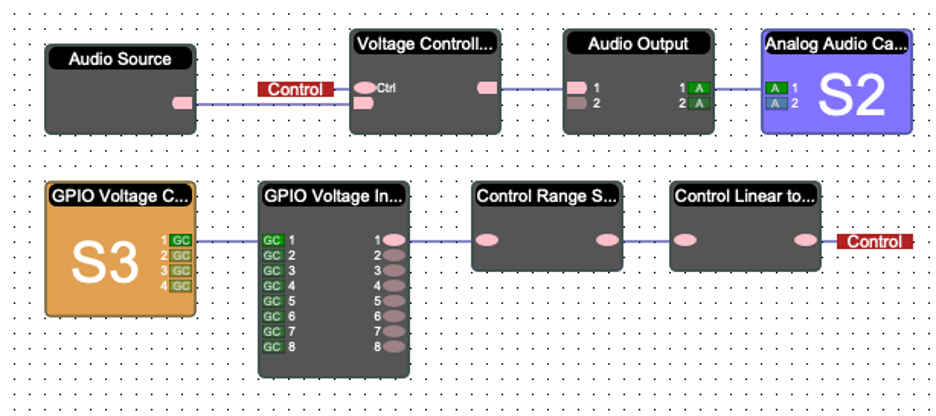
Add these blocks to your project:
GPIO Voltage Input Card
Control Range Scaler
Control Linear to Log Converter
Voltage Controlled Amp
Analog Audio Output Card
Step 2 — Connect audio and control
Route your audio source into the Voltage Controlled Amp.
Route the scaled control signal (from the Control Range Scaler → Linear to Log Converter) into the control input of the Voltage Controlled Amp.
Step 3 — How the control works
Potentiometer at full rotation → Unity gain
The meter shows the corrected control value using the Control Range Scaler, compensating for voltage variation.
3. Test
Rotate the potentiometer → audio volume changes accordingly
Verify that the meter reflects the accurate, scaled control value.