
LED Indicator Triggered by Audio
This guide shows how to light an LED automatically when audio reaches a defined threshold.
1. Hardware
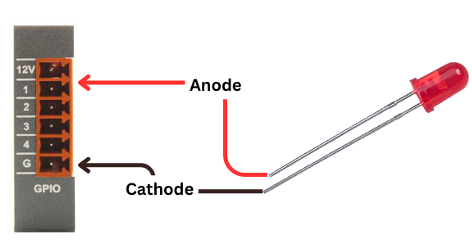
Wire the LED to the GPIO Output on the GPIO Card
(Follow the wiring reference for correct polarity and pin selection.)
2. Software
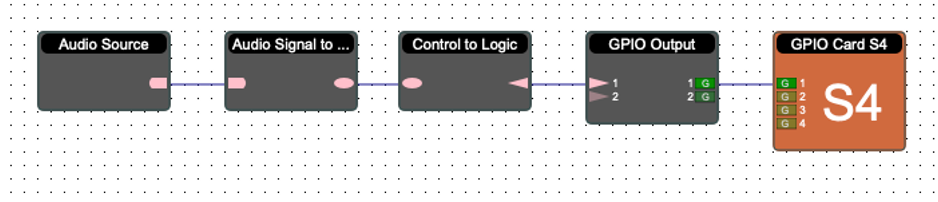
Step 1 - Add required modules
Add the following blocks to your project:
Audio Source
Audio Signal to Control
Control to Logic
GPIO Output Card
Step 2 - Configure GPIO
Open the GPIO Output Card and assign the correct GPIO channel that the LED is connected to.
Step 3 - Set the audio threshold
In the Audio Signal to Control module:
Open Object Properties
Adjust the threshold level where the LED should activate
This threshold determines the point at which audio is considered “active.”
3. Test
Play audio and verify LED behavior:
Audio above threshold → LED lights up
Audio below threshold → LED turns off
This confirms that the LED is responding correctly to signal level.