
Dual Momentary Sink-to-Ground for Screen Control
This guide explains how to control a motorized screen using two momentary sink-to-ground triggers: Up and Down.
1. Hardware
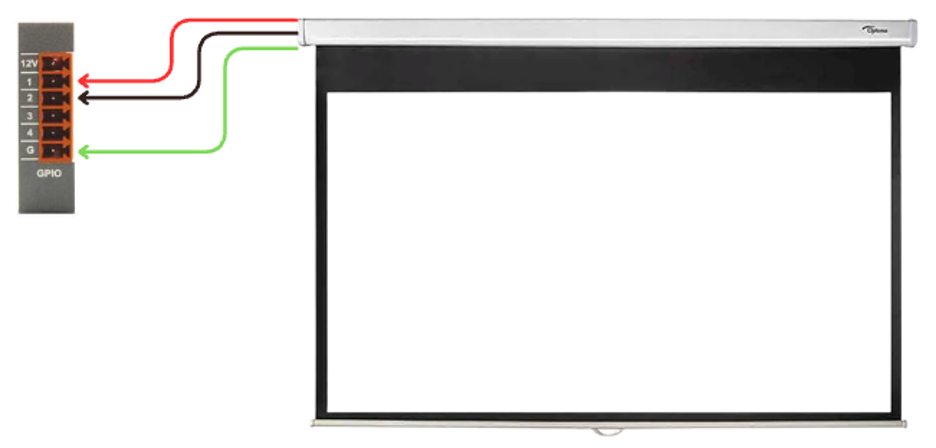
Wire the screen control inputs to the GPIO Card
(Follow the wiring reference for correct sink-to-ground wiring.)
Each screen direction, Up and Down, will connect to its own GPIO Output.
2. Software
Step 1 - Add required modules
Add the following blocks to your project:
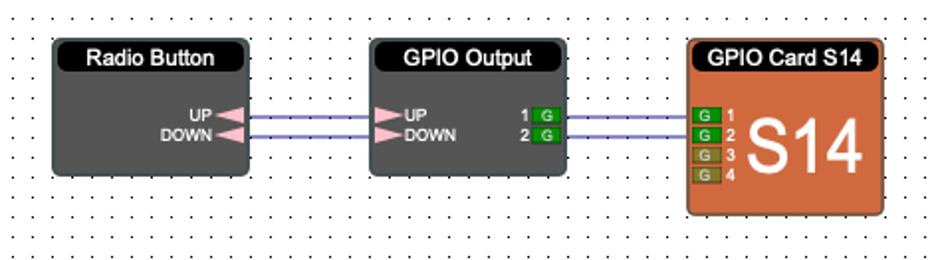
Screen Radio Button (configured with 2 nodes: Up and Down)
GPIO Output Card
Step 2 - Connect logic paths
Connect the Up node from the Screen Radio Button to the GPIO Output channel for Screen Up.
Connect the Down node to the GPIO Output channel for Screen Down.
Step 3 - Assign GPIO channels
Open the GPIO Output Card and assign each output to the correct pins that connect to the screen controller.
3. Test
Verify screen movement:
Press Up → screen raises
Press Down → screen lowers
The screen should respond immediately to each momentary press.